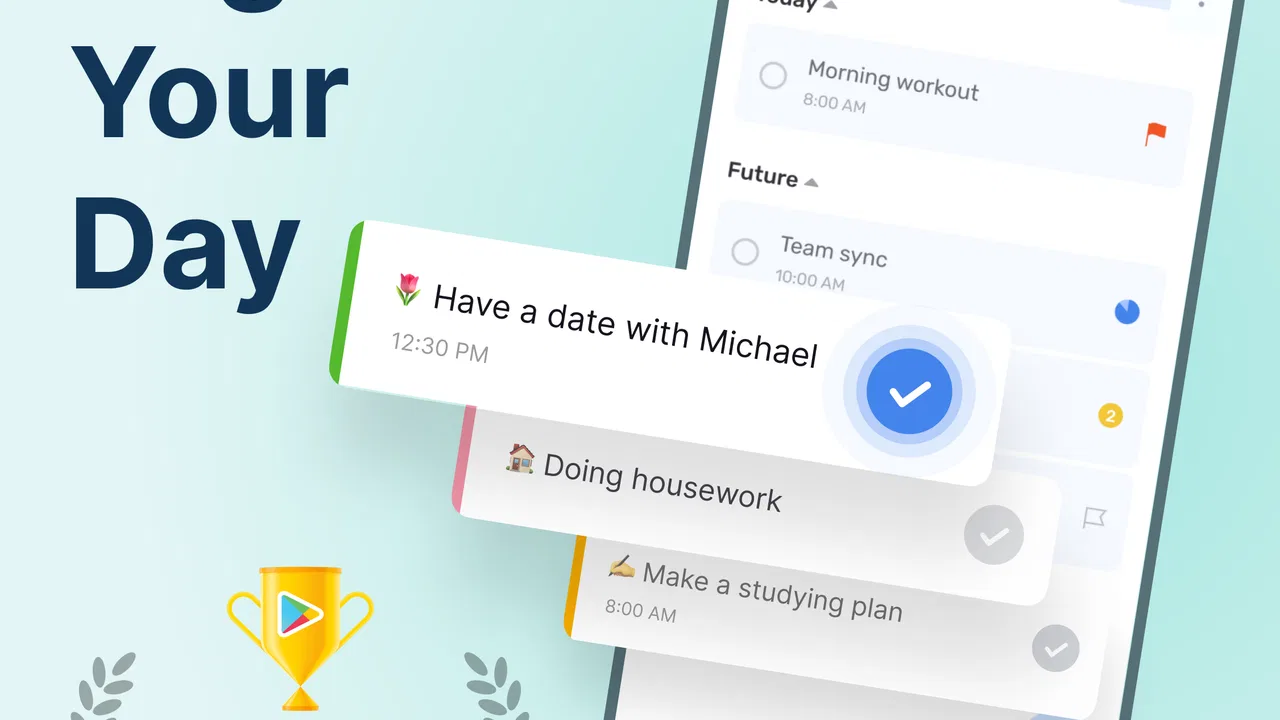
Todoery: To Do List & Planner
- 4.6
- Rating
- 10.00M
- Installs
- Free
- Price

 Analysis by App-foxy
I came away from Todoery: To Do List & Planner with a clear impression: it is a practical productivity app for people who want one calm place to organize daily responsibilities without committing to a complicated project-management system. I used it as a lightweight planner rather than treating it like a full office suite, and that distinction matters. Its appeal is not endless customization; it is the simple act of turning a crowded day into a visible list of manageable actions.
The app is free to download and is suitable for Everyone, which makes it easy to try without a financial commitment. It comes from Dairy App & Notes & Audio Editor & Voice Recorder, a developer whose name reflects a broader collection of everyday utility tools. Todoery sits in the productivity category, and its store summary points to daily scheduling, task organization, reminders, and calendar planning. In actual use, I found that combination most useful when I wanted a personal routine, not a shared corporate workflow.
Why Todoery works best as a focused daily planner
The strongest part of the experience is the way a task list can become a daily plan instead of remaining a pile of vague intentions. I prefer writing down the next physical action rather than entering something broad such as “sort out finances.” A more useful entry would be “check the electricity bill” or “send the receipt to my accountant.” Todoery is at its best when I use it to make those actions visible and time-aware.
You May Also Like

 Blood Strike: 2.5 Anniversary
Blood Strike’s Loadouts Turn Every Drop Into a Tactical Gamble
A close look at Blood Strike’s custom loadouts: how fast access to signature weapons reshapes its battle royale rhythm, rewards preparation, and narrows the gap between fights.

 Pandora - Music & Podcasts
Pandora’s Music Is Easy to Start, but Harder to Recover
Pandora’s strength is its low-effort path from a seed to a station. Its weak spot is how much confidence it asks you to place in connection, setup, and quiet recovery.

 8 Ball Pool
 Is Built on Rivalries, Rematches, and Routine
A close look at the rivalries, rematches, shared routines, and unanswered safety questions that turn a quick pool match into a persistent mobile community.

 Samsung Music
’s Quiet Strength Is Playing What You Already Own
Its reach comes less from spectacle than from dependable access to a personal library. That simplicity is both the app’s strongest retention engine and its ceiling.

 AccuWeather: Weather Radar
AccuWeather Review: A Quick, Clear Forecast for Everyday Decisions
For everyday plans, the best forecast is the one you can understand quickly. AccuWeather makes rain timing, radar, and local conditions easy to act on, with a few trade-offs.

 Hill Climb Racing
Why Hill Climb Racing Still Turns Crashes Into One More Run
A tiny car, a bumpy hill and one more upgrade: Hill Climb Racing keeps resurfacing because its simple chaos makes every near-miss feel personal.
More From Our News Desk



That approach also reveals an important strength: the app can help separate remembering from doing. I can place an obligation into a schedule so I do not have to keep rehearsing it mentally, then return to the list and concentrate on what is actually due. This is a small change, but it reduces the common problem of opening a task app and seeing an intimidating wall of unfinished items.
I found the planner particularly comfortable for recurring personal routines. A morning checklist, weekly shopping preparation, study blocks, household maintenance, or a simple evening wind-down can all live in the same general system. The advantage is consistency. Instead of relying on scraps of paper, scattered notes, and memory, I can check one place when deciding what deserves attention next.
The calendar element is useful when a task needs context. A plain list tells me what exists; a calendar view helps me understand where an obligation fits among the rest of the day. That difference is important for appointments, errands, and preparation work. If I have a meeting in the afternoon, I can think backward and schedule the document review or travel preparation earlier rather than discovering the conflict at the last minute.
One workflow I recommend is to plan tomorrow before finishing today. I first capture every loose task, then choose only the actions that realistically fit the following day. After that, I leave the remaining items in the broader task area instead of forcing them into an overpacked schedule. This prevents the planner from becoming a record of personal disappointment. The app is much more effective when the list reflects available time rather than wishful thinking.
Another useful habit is to use short, specific task names and put the explanation in the note area when needed. “Prepare presentation” is too large to feel actionable, while “choose three examples for presentation” gives me a clear starting point. This is not a flashy feature, but it is the kind of discipline that makes a to-do app genuinely helpful. Todoery provides the structure; the quality of the plan still depends on how carefully I phrase the work.
Where the reminders make a real difference
Reminders are most valuable for tasks that are easy to forget but unpleasant to miss. I would use one for renewing a document, taking something out of the freezer, calling a service provider during opening hours, or bringing a specific item to an appointment. These are not necessarily large projects, yet they create friction when they disappear from memory. A reminder turns them into an external prompt at the moment they matter.
I would not attach reminders to every minor action. When every item produces an alert, the alerts stop feeling important. My better approach is to reserve them for deadlines, time-sensitive errands, and habits that have a clear trigger. For ordinary tasks, the scheduled list is enough. This creates a useful distinction between “I should do this today” and “I must be prompted at this particular time.”
A realistic example is a busy weekday involving work, family, and errands. In the morning, I can see the appointments that anchor the day, the short tasks that fit between them, and the one or two items that need a reminder. At lunchtime, I can move an unfinished task rather than mentally carrying it. In the evening, I can review what was completed and prepare the next day. That rhythm is more valuable than any individual button because it makes planning a repeatable habit.
For students, the same method works with reading, revision, assignment preparation, and submission deadlines. The key is to schedule preparation before the final due date. For someone working from home, Todoery can separate household interruptions from professional priorities by giving each task a deliberate place. For a family organizer, it can serve as a personal memory aid, although I would be cautious about treating it as a shared household command center unless the specific collaboration needs are very modest.
The practical trade-off against larger productivity tools
Compared with a paper notebook, Todoery has a clear advantage when timing matters. A notebook is pleasant for free-form thinking, but it does not naturally remind me that a task belongs at a certain point in the day. Compared with a basic notes app, Todoery gives tasks a more deliberate structure. I am less likely to bury an important action inside a long paragraph of unrelated thoughts.
Against large project-management platforms, the trade-off goes in the opposite direction. Those services are usually better for teams, dependencies, detailed project views, file-heavy work, and accountability across several people. Todoery feels more appropriate for an individual who wants to manage personal responsibilities without learning a business workflow. If I needed assignments, comments, approvals, or a detailed project history, I would look elsewhere rather than trying to stretch this app beyond its natural role.
It also differs from a calendar-only approach. A calendar is excellent for fixed events, but many tasks do not have a precise appointment. “Buy printer paper” or “outline the first chapter” needs a place in a plan without necessarily occupying a formal calendar slot. Todoery’s combination of tasks and scheduling is better suited to that middle ground. I can treat a task as planned work rather than pretending every obligation is an event.
The app’s public reception suggests that this straightforward approach connects with a large audience. It holds a 4.6 average from around 705 thousand ratings, has more than 7 million reviews, and has passed 10 million installs. Those figures do not prove that it will fit every workflow, but they do indicate that the basic concept is resonating with many Android users. I would interpret that popularity as evidence of accessibility rather than as a reason to ignore the app’s limits.
The weakness: simplicity can become restrictive
My main reservation is that a simple planner can feel limited once a person expects a complete productivity ecosystem. Todoery is easy to approach because it does not force me to build an elaborate system, but that same restraint may disappoint users who want deep customization. People who organize work through complex projects, multiple layers of subtasks, extensive tags, or team coordination should examine the app carefully before moving their entire workflow into it.
There is also a psychological limitation to any schedule-centered task app: it can encourage overplanning. Filling every hour may look productive while leaving no room for delays, messages, travel, or fatigue. I found the app more useful when I treated the calendar as a guide instead of a promise. Leaving open space is not wasted capacity; it is what makes the plan survive contact with a real day.
Another point to consider is the free-to-paid boundary. The app is free, but optional in-app purchases range from $0.99 to $52.99 per item. That gives beginners a low-friction way to start, yet anyone who expects every advanced convenience to remain free should review the purchase choices before building a long-term routine around them. I would begin with the free experience, decide whether the daily workflow genuinely helps, and only then consider paying for extras.
I also would not use a personal planner as the sole place for information that requires formal records, guaranteed team visibility, or specialized professional controls. A task reminder is not a replacement for an official appointment system, a shared work tracker, or a secure document-management process. Todoery can remind me to handle something, but the task itself may still need to be completed in another service.
Who should choose it, and who should skip it
I think Todoery is a strong match for someone who repeatedly says, “I know what I need to do, but I keep forgetting when to do it.” It is also a good fit for people moving from paper lists to digital planning and for users who want a daily schedule without the intimidating density of a professional project tool. Parents, students, freelancers, and busy individuals managing errands can all benefit if they are willing to keep tasks short and review the plan regularly.
It may also suit someone who has tried a notes app and found that tasks disappear among shopping ideas, saved information, and personal writing. The dedicated planning context creates a useful boundary. I can capture an action as an action, give it a place, and return to it without searching through a general notebook.
I would recommend skipping it if your priority is collaborative project management, detailed time tracking, or a highly specialized workflow. A team that needs every member to see ownership and progress may be better served by a service built around shared work. Likewise, a person who enjoys a completely free-form bullet journal may find the scheduling structure unnecessary. The app is not trying to replace every productivity method, and forcing it to do so would create more work than it removes.
Before committing, I would spend several days testing one narrow routine rather than importing every responsibility at once. Add a morning checklist, a few time-sensitive errands, and one recurring weekly task. Notice whether the reminders arrive at useful moments and whether the schedule remains realistic. This trial reveals more than creating a huge list on the first day, because it tests whether the app fits the way you actually make decisions.
Everyday details that determine whether it sticks
The most effective setup is usually the least dramatic one. I would create a small set of clearly named tasks, assign dates only when they matter, and review unfinished items at the end of the day. If something remains unfinished several times, I would rewrite it into a smaller action instead of endlessly carrying it forward. That practice turns Todoery from a storage box into a decision-making tool.
I would also keep scheduled tasks separate from someday ideas. A future wish list can be useful, but mixing it with today’s obligations makes the current view noisy. When I need to remember a possibility, I can capture it without pretending it belongs in the next few hours. This simple separation protects attention and makes the daily list more trustworthy.
For recurring work, I would check whether the repetition still reflects reality every few weeks. A routine that was helpful during one season may become irrelevant later. Deleting or adjusting outdated items matters because stale reminders create distrust. The app can support consistency, but it cannot decide which routines still deserve space in my life.
Notifications should be treated as a limited resource. I would use them for consequences, deadlines, and moments when memory is unreliable, not as background noise for every task. If I receive too many prompts, I am more likely to dismiss all of them. A smaller number of well-chosen reminders makes the app feel like an assistant rather than an interruption machine.
My verdict on Todoery
Todoery succeeds because it focuses on a familiar problem: turning everyday intentions into visible, scheduled actions. I like it most as a personal planner for routines, errands, study, and time-sensitive responsibilities. Its blend of task organization, reminders, and calendar planning is more useful than a plain note, while its approachable design makes it less demanding than a full project-management platform.
The limitations are meaningful. Users seeking advanced collaboration, elaborate project structures, or a deeply customizable productivity system may outgrow it. The optional purchases also deserve a quick look before anyone assumes the entire long-term experience will remain free. Most importantly, the app cannot rescue an unrealistic plan; it only makes that plan easier to see.
Still, for someone who wants a straightforward daily organizer, I think it is worth trying. It is free, carries an Everyone age rating, and has been available since December 14, 2020, giving it a substantial presence rather than the feel of an untested experiment. My recommendation is simple: start with a small routine, keep the tasks concrete, and use reminders sparingly. If that approach helps you finish more of what matters, Todoery: To Do List & Planner earns a place in your daily toolkit.
FAQs for Todoery: To Do List & Planner
01What is Todoery: To Do List & Planner used for?
Todoery: To Do List & Planner is designed to help you organize everyday responsibilities, personal goals, errands, and longer-term plans in one place. You can create tasks, arrange them by priority or schedule, and keep track of what has been completed. It may be useful for students, professionals, families, and anyone who wants a clearer overview of upcoming work without relying on scattered notes or reminders.
02Does Todoery support reminders, due dates, and recurring tasks?
The app is intended for structured task planning, so users should look for tools such as due dates, reminders, priorities, and recurring tasks when setting up their workflow. These features can make it easier to remember appointments, repeat household chores, or manage deadlines. Before downloading, check the current app listing and device permissions, because the exact reminder options and notification behavior may vary between Android and iOS versions.
03Can Todoery: To Do List & Planner be used for personal and work organization?
Yes, Todoery can be adapted to several types of planning. You might use separate lists for work projects, shopping, study assignments, travel preparation, or household duties. Organizing tasks into categories helps prevent important items from being lost among minor errands. However, users who need advanced team collaboration, detailed project dependencies, or enterprise-level reporting should verify whether those features are included before replacing a dedicated professional project-management service.
04Is Todoery free to download, and are there in-app purchases?
The download model, available features, advertisements, and premium options can change over time, so prospective users should review the official Google Play Store or Apple App Store listing before installing Todoery. Some productivity apps provide core task management at no cost while reserving additional themes, planning tools, synchronization, or advanced reminders for a subscription or one-time purchase. Always check the pricing details for your region.
05Does Todoery synchronize tasks across devices and protect my data?
If you plan to use Todoery on more than one phone or tablet, confirm whether it offers account-based synchronization and whether the same feature is available across Android and iOS. You should also review its privacy policy to understand how task information is stored, processed, and backed up. Avoid entering highly sensitive information unless you are comfortable with the app’s security practices, permissions, and data-handling terms.
Pros
- Quickly add tasks with a clean
- distraction-free interface.
- Useful reminders help prevent important tasks from being forgotten.
- Task organization makes it easier to separate personal and work plans.
- Recurring tasks reduce the need to recreate regular responsibilities.
- A lightweight design should run smoothly on most modern devices.
Cons
- Advanced planning features may require time to learn and configure.
- The free version may limit certain productivity or customization tools.
- Users wanting team collaboration may find the sharing options limited.
- Notification-heavy setups can become distracting without careful adjustment.
- Some features may depend on an internet connection or account access.

Todoery: To Do List & Planner
Gallery